Use ArcGIS Server web services in ArcGIS Pro
ArcGIS REST Services (ArcGIS Server) allow you to load GIS data directly from the County's servers into an ArcGIS Pro session on your computer. This means the data will always be up-to-date; no need to re-download a shapefile. You'll be using the same data that Henderson County staff are using.
Instructions
- Go to https://gisweb.hendersoncountync.gov/arcgis/rest/services
- Navigate to a layer you'd like to add to your ArcGIS Pro project.
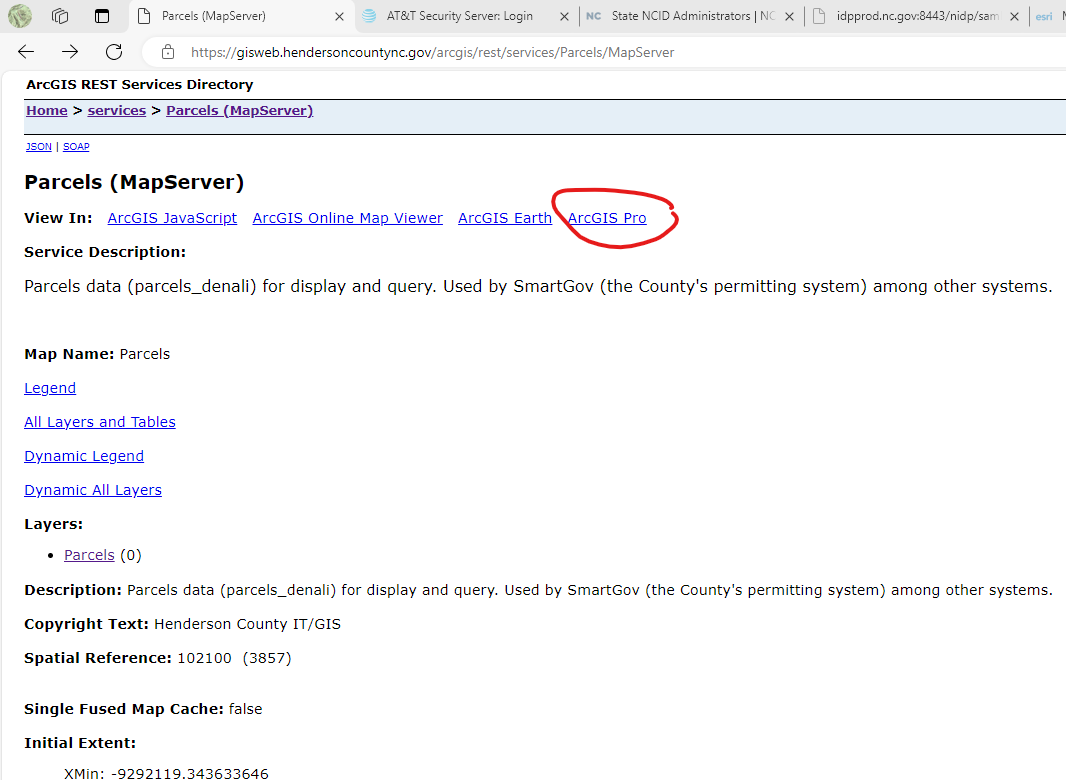
- Click the "ArcGIS Pro" link (see image below) - this will download a ".pitemx" file to your computer.
- Double-click this file to open it with ArcGIS Pro.